
User Authority Descriptions
|
AUTHORITY |
DESCRIPTION |
|---|---|
|
Temp User Code |
Apply an expiration date and time to a user code. |
|
Anti-Passback |
Properly exit an area that was previously accessed. |
|
Access Time |
Assign up to eight schedules of door access to a profile. |
|
Re-Arm Delay |
Delay automatic re-arming when the user disarms an area outside of a schedule. |
|
Easy Arm/Disarm |
Automatically arms or disarms areas assigned to your code and re-arms the system in 60 minutes if it is outside of the scheduled disarm time. |
|
Secondary Language |
Apply a secondary language to a user’s credentials. |
|
Card Plus Pin |
Access control feature that requires a card read and PIN entry for arming/disarming and access for all areas. |
|
Wi-Fi Setup |
Add, remove, or test Wi-Fi on your system. |
|
Technician User |
Cannot disarm a system that has been armed by a standard user. If the system is armed by a Test User, that person can disarm it. This is used for test purposes only. |
|
Inactive User Audit |
This option allows you to choose the number of days a user code can remain unused before the panel sends an Inactive User Code message to the receiver and changes the user code to inactive. The range is 0-425 days. The default is 0 (zero). This feature is only available for XR550 panels. |
|
Dual Authority |
Dual Authority requires two user codes to be entered at a system keypad to disarm and/or arm a specific area. Dual Authority must be enabled in Area Information programming by an installer to use this feature. Selecting DIS (Disarm) also enables Dual Authority for Access Control. When a user presents a user code to a keypad requesting to disarm or arm this area, 2ND CODE displays and requires the entry of a different user code with at least the same authority. The second user code must be entered within 30 seconds. |
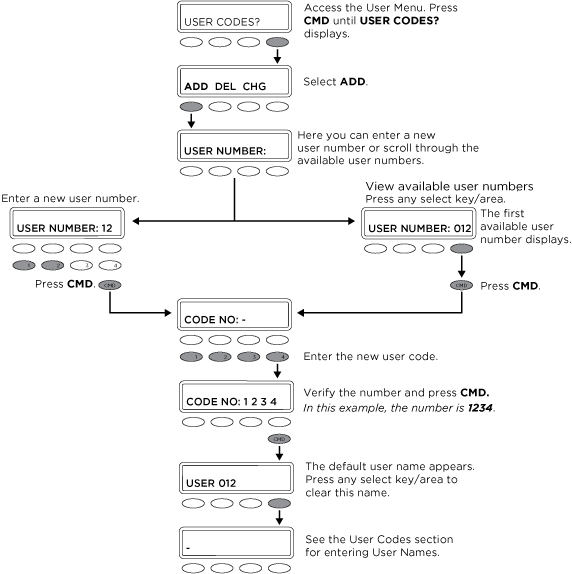
Add a User Code
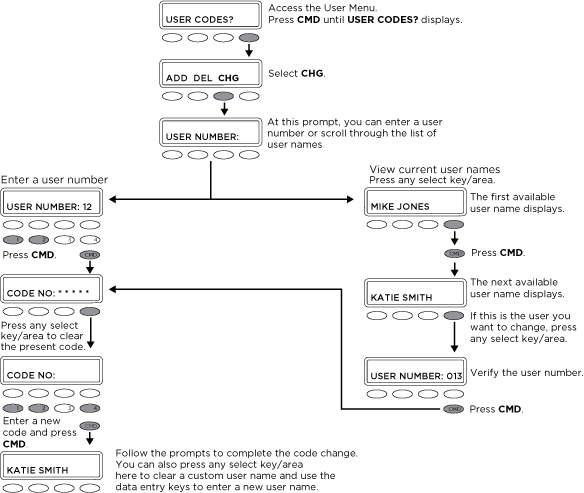
Change a User Code
Common Keypad Displays
|
DISPLAY |
DESCRIPTION |
|---|---|
|
LOBAT |
The battery in a wireless transmitter is low. |
|
MISNG |
Periodic reports from wireless transmitters are not being received by the panel. |
|
WIRELESS TRBL |
A device in your wireless system is not working correctly. |
|
WIRELESS RECEIVER
|
Your wireless receiver has detected a jamming signal while disarmed. |
|
WIRELESS RECEIVER
|
Your wireless receiver has detected a jamming signal while armed. |
|
ALARM |
A burglary zone has been tripped. |
|
TRBL |
There is a problem with a protection device or other system component. |
|
ALARM NOT SENT |
The alarm was aborted and a message was not sent to your monitoring station. |
|
ALARM CANCELED |
The alarm message sent to your monitoring station was aborted. |
|
ALARM VERIFIED |
A valid burglar alarm was manually verified by the user. |
|
ENTER CODE OR PRESENT CARD |
The system requires a user code or credential. |
|
TRY AGAIN |
The system does not recognize the user code, card, or pin or is not authorized for that user. |
|
INVALID CODE |
The code is not recognized. |
|
INVALID PROFILE |
Attempted function that a user is not assigned. |
|
INVALID AREA |
Attempted door access to an area that a user is not assigned. |
|
INVALID TIME |
Attempted access by a user outside of an assigned schedule. |
|
FAILED TO EXIT |
A user has attempted to re-enter an area that they did not exit properly. |
|
SYSTEM TROUBLE |
There is a problem with one or more of your system components. |
|
SYSTEM BUSY |
Your system is performing another task of higher priority. |
|
TEST IN PROGRESS |
Your system is currently being tested. |
|
HOME SYSTEM ON |
The perimeter is armed. |
|
PERIMETER ON |
The perimeter is armed. |
|
ALL SYSTEM ON |
All areas and perimeter are armed. |
|
SLEEP SYSTEM ON |
The perimeter and interior areas are armed, excluding the bedroom area. |
|
HOME GUEST 1 ON |
The first guest house perimeter is armed. |
|
SLEEP GUEST 1 ON |
The first guest house perimeter and interior are armed, excluding the bedroom area. |
|
ALL GUEST 1 ON |
All first guest house areas are armed. |
Graphic Touchscreen Keypad Icons
.png?cb=0a2bf7912cccce47af3fab5dcc7380df)